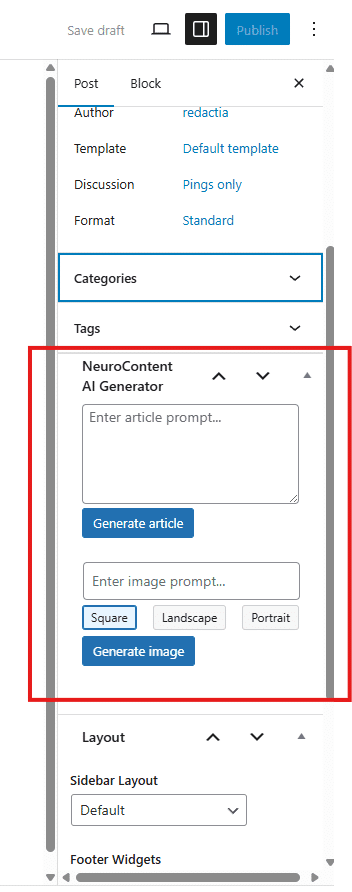
The Meta Box NeuroContent AI Generator appears on the Add New Article page in WordPress and provides an interface for generating AI-written articles and featured images.
AI Article Textarea – enter a prompt and the system will generate a full article with ChatGPT. The result is inserted automatically into the editor (Gutenberg or Classic) in real time.
AI Image Input – enter a description for the featured image you want to generate.
Image Format Selector – choose the aspect ratio for the generated image (Square, Portrait, Landscape).
Where is the image – the generated image is saved locally on your WordPress site and is immediately available in the Media Library, just like any manually uploaded file.
This ensures that AI-generated content is seamlessly integrated into your publishing workflow and managed the same way as any other WordPress media or post content.
Settings Available in NeuroContent Admin Settings
Persona Selector – select the role or tone the AI should adopt when writing the article (e.g. neutral policy analyst, critical journalist, storyteller). This helps you control the voice and style of the generated text.
WordPress AI Web Search allows AI-generated articles to use real-time information from the internet before writing the content. This feature is available in the NeuroContent WordPress plugin and helps websites generate more accurate and relevant articles automatically. Many WordPress sites use AI to generate articles automatically. This saves time, but it also creates a common…
A WordPress AI analytics dashboard helps website owners understand how AI content generation works inside WordPress. The new Analytics tab in NeuroContent PRO provides a simple WordPress AI analytics dashboard that shows tokens, costs, activity, and automation performance. Running a WordPress site that uses AI to generate content can save time. However, it also creates…
Launching a WordPress blog is easy. Keeping it active for months or years is much harder. Many websites start strong and then slowly stop publishing new content. The homepage stays the same, the blog section stops growing, and visitors begin to wonder if the site is still alive. This is one of the most common…
Most WordPress blogs do not die because of bad ideas. They die because the owner runs out of time, motivation, or energy to keep writing. At the beginning, everything feels exciting. You publish a few posts, traffic slowly appears, and the site starts to look alive. Then something happens. You sit down to write the…
Publishing an article should be the end of the job, not the beginning of another repetitive task. Without automation, you still have to open Facebook, copy and paste the article link, write a caption, check the preview, publish the post, and repeat the process every time you add new content to WordPress. NeuroContent can handle…
Auto blogging has a bad reputation. To be fair, it earned it. For years, “auto blogging” often meant low-quality posts, unreadable filler, and websites that looked like they were built by a toaster with Wi-Fi. But the idea behind it was never the real problem. The real problem was bad execution. Because every site owner…
Running a WordPress site sounds easy until the content calendar starts staring back at you. You need blog posts. You need featured images. You need something worth publishing. And somehow, this has to happen while you are also fixing plugins, answering emails, updating pages, and dealing with the usual “quick task” that takes 40 minutes.…
Publishing content is only half the job.Distribution is what actually drives traffic. With the new Social Share feature in NeuroContent PRO, you can automatically publish or schedule your WordPress articles directly to your Facebook Pages — without leaving the editor. This article explains how it works, how to configure it, and how you can integrate…
Contains information related to marketing campaigns of the user. These are shared with Google AdWords / Google Ads when the Google Ads and Google Analytics accounts are linked together.
90 days
__utma
ID used to identify users and sessions
2 years after last activity
__utmt
Used to monitor number of Google Analytics server requests
10 minutes
__utmb
Used to distinguish new sessions and visits. This cookie is set when the GA.js javascript library is loaded and there is no existing __utmb cookie. The cookie is updated every time data is sent to the Google Analytics server.
30 minutes after last activity
__utmc
Used only with old Urchin versions of Google Analytics and not with GA.js. Was used to distinguish between new sessions and visits at the end of a session.
End of session (browser)
__utmz
Contains information about the traffic source or campaign that directed user to the website. The cookie is set when the GA.js javascript is loaded and updated when data is sent to the Google Anaytics server
6 months after last activity
__utmv
Contains custom information set by the web developer via the _setCustomVar method in Google Analytics. This cookie is updated every time new data is sent to the Google Analytics server.
2 years after last activity
__utmx
Used to determine whether a user is included in an A / B or Multivariate test.
18 months
_ga
ID used to identify users
2 years
_gali
Used by Google Analytics to determine which links on a page are being clicked
30 seconds
_ga_
ID used to identify users
2 years
_gid
ID used to identify users for 24 hours after last activity
24 hours
_gat
Used to monitor number of Google Analytics server requests when using Google Tag Manager